Hello World.
This is my very first post, and I’m here to help you enjoy Korea like a local. Let’s cut to the chase.
Navigating Korea:
Google Maps vs. Naver Maps vs. KakaoMap
Which one should you actually use?
I have all three apps installed, but let me be real: I don’t just “rarely” use Google Maps in Korea—I don’t use it at all.
Why? Because of security regulations, South Korea restricts the export of map data. This means Google Maps’ navigation isn’t nearly as accurate here as it is in other countries. It’s especially limited when it comes to public transit routes and real-time info. If you rely on it, you’re going to get lost.
So, what are the alternatives? I use both Naver and Kakao, but for totally different reasons.
The Giants of Korea:
- Naver: The “Korean Google.” It’s the gold standard for searching anything.
- Kakao: The company behind KakaoTalk—the messenger everyone in Korea uses (we use it way more than texting).
Basically, every single person in Korea has both of these apps.
I use Naver Map to save places.
Whenever I see a delicious-looking restaurant on social media, I save it here. It’s the best for checking menus and prices.
Why? As I mentioned, Naver is the #1 search platform in Korea. Shop owners prioritize registering their business, menus, and photos here first. It’s the most up-to-date database you’ll find.
I use KakaoMap for moving.
Wait, why don’t I use Naver Map for navigation? Well, you can, but in my experience, Naver sometimes suggests slightly inefficient routes. Also, KakaoMap feels a bit more “on the dot” with bus and subway arrival times.
If you’re lazy and only want to download ONE app? Go with KakaoMap.
While Seoul’s transit is frequent, some buses have long intervals. Missing one of those can ruin your schedule, and KakaoMap is your best bet for avoiding that. Plus, it has a save-place feature too! (I just use Naver because it’s more integrated with my search habits.)
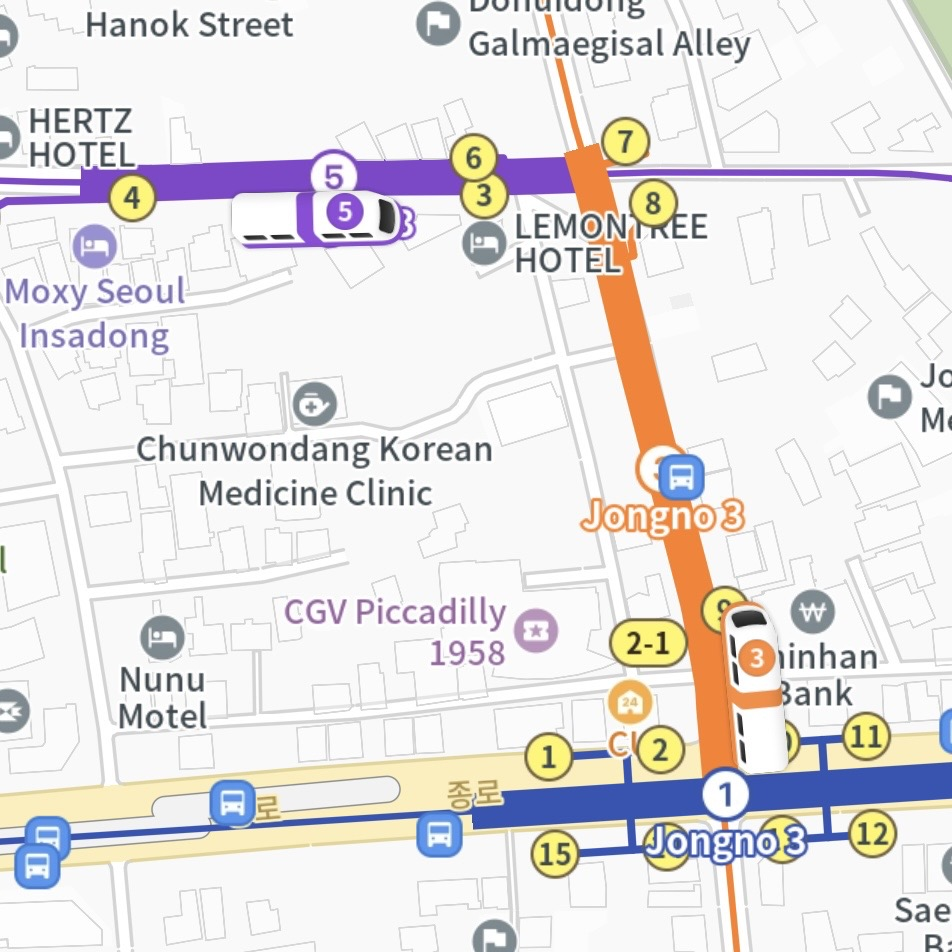
The Coolest Feature: Recently, KakaoMap updated its UI so that when you zoom in on a station, you can actually see the subway train moving in real-time. I haven’t really used it for anything practical yet, but hey, it’s pretty cool, right?
Quick Wrap-up
There isn’t one absolute winner; it really comes down to preference. This is just my routine as a local student, so try them both and see what sticks.
I’ll probably write a more detailed guide later on how to actually master these maps (like checking subway directions, car numbers, etc.).
See you in my other posts. An-nyeong!